Key Overview
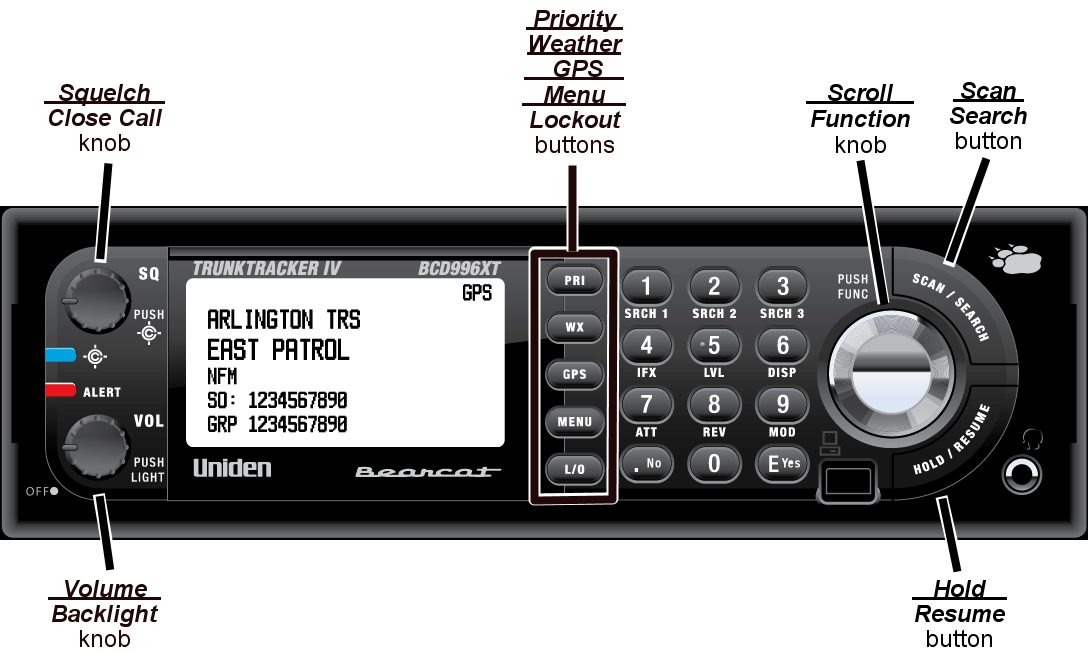
The diagram below shows the keys and what they are called throughout the guide:
Operating the controls
Each button has at least two different actions which you control using the key combinations explained below.
- Tap : press the button and release it immediately
- Double tap : press the button twice, as quickly as possible (within 1 second)
- Press & hold : press the button and keep it pressed for at least 2 seconds before releasing it
- FUNCTION + tap : press and release FUNCTION , then tap the button
- FUNCTION + Double tap : press and release FUNCTION , then double tap the button
- FUNCTION + Press & hold : press and release FUNCTION , then press and hold the button
Using the FUNCTION button
When you tap FUNCTION (the scroll knob), the scanner remembers the
FUNCTION + key combination for the next 3 seconds; during this time, it displays an
F icon at the top of the screen.
If you want the scanner to maintain the
FUNCTION + key combination longer, press & hold FUNCTION. The scanner remembers the
FUNCTION + key combination until the next time you tap FUNCTION; during this time, it displays
Function Key Holding and flashes the
F icon at the top of the screen.
Key functions in different operation modes
The keys have different functions in each operation mode: